
What do we mean when we say data ingestion? Essentially it’s introducing data from new sources into an existing system or process.
The ingestion process usually requires a sequence of operations, from retrieving the data to parsing it, validating it, transforming and enriching it, through to loading and archiving.
The data is often characterized by the fact that it's coming from third parties, often customers whose data you're onboarding, and is of an unknown, inconsistent format and quality, and it's this that can make ingesting that data challenging.
Building data ingestion pipelines that can perform all the steps needed, while accounting for inconsistencies and adapting to whatever new data comes in, ideally happens automatically.
In this article, we'll be covering what data validation means, where in a pipeline it belongs, the challenges of scaling it, how AI is changing rule generation, what should happen once data has been validated, and a real technical example of automated validation working in practice.
Key takeaways
-
Data validation is the process of ensuring data has undergone checks, so its quality is as expected and it's correct and useful, distinct from data profiling, which gives a holistic, statistical view of an entire dataset.
-
There's no single right place to validate data in a pipeline; the right point, at ingestion, pre-transformation, mid-pipeline, or post-load, depends on the type of pipeline and what you're checking for.
-
Data quality issues cause approximately 46% of data integration complaints, and most stem from missing validation rules that let bad data propagate through a pipeline before anyone notices.
-
As data volume scales, so does the absolute amount of bad data you need to detect, making automated, reusable validation essential rather than optional.
-
AI can help generate and adjust validation rules based on profiling and metadata, particularly for detecting schema drift, but it works best as an assistant to execute defined business rules, not a replacement for them.
-
A well-designed validation process lets you decide precisely what happens to bad data, whether that's failing the record, failing the whole run, or logging it and continuing, rather than treating every issue the same way.
What is data validation?
Data validation is the process of ensuring that data has undergone some sort of cleansing or checks to make sure the data quality is as expected and the data is correct and useful.
Where should you validate data in a pipeline?
The somewhat-unhelpful answer is that you should perform these checks wherever in the pipeline it makes sense to validate the data. And that can change depending on the type of pipeline you're working with. Typically, data validation is done either at the beginning or the end of the data ingestion process.
You also need to decide at what level to validate your data, at the record, file, or process level, or a combination:
-
Process level: is the process itself working as expected?
-
File level: are the files you're receiving what you're expecting?
-
Record level: are the details in each record correct?
The challenges of scaling data validation
On average, 47% of newly created data records contain at least one critical error, according to Harvard Business Review. That's not a rounding error, it's closer to a coin flip, and it's exactly why validation can't be an afterthought bolted onto the end of a pipeline.
Bad data often occurs as a percentage of your data, so as the volume of data you're dealing with scales up, so does the amount of bad data you're having to detect and filter out.
Data validation can also become challenging when you're managing lots of data sources. Ideally, you want to handle all your data ingestion in one pipeline, even when your sources vary, you don't want to build and maintain different pipelines for each source. And it's important for reliability and consistency that your data validation should be automated.
This isn't a small-scale problem either: data quality issues cause approximately 46% of data integration complaints, according to G2's data integration reviews, and most of those complaints trace back to missing validation rules that let bad data propagate before anyone notices.
What features should you look for in a data ingestion tool?How AI is changing data validation rules
AI is increasingly used to help generate and adjust data validation rules, but it works best as an assistant to execute defined business logic, not a replacement for it.
AI-assisted profiling can look at incoming data and suggest validation rules based on the patterns it finds, and it's particularly useful for detecting schema drift automatically, spotting when a new field appears, an existing one disappears, or a data type changes, without someone having to notice the change manually first. This is important when you're onboarding a new source or client, where you don't yet know the shape of the data well enough to write rules for it by hand.
What AI hasn't replaced, and likely won't in the immediate future, is human-defined business rules for anything tied to specific business meaning rather than statistical pattern. A rule stating that a teacher ID must follow a particular school's exact formatting convention isn't something a model can reliably infer from the data alone, it needs to come from someone who understands that school's system.
The strongest approach treats AI as a way to catch structural drift and suggest a starting point, while keeping business-specific rules, like the ones covered in the example later in this guide, explicitly defined and owned by the people who understand them.
What happens after the data is validated?
To keep the automated ingestion process flowing, you need to decide what happens after your data is validated:
-
Do you keep processing the data or do you fail?
-
Do you fail the record, or the entire ingestion process?
-
Do you keep processing and log suspect or invalid data?
- How do you present the validation results to provide actionable insights?
6 goals for automated data validation
1. Reduce the burden on clients
Manual error checking isn't just tedious, it's expensive. Data teams can spend as much as 140 hours a week manually checking for errors in their pipelines. Automating validation isn't just about catching more errors, it's about reclaiming that time for higher-value work. Here's what a good automated data validation setup should aim for.
You want to make it as easy as possible for your customers to give you their data. Which means you not only have to be lenient in the formats you expect but you need to be able to:
-
- Fix common errors automatically
- Inform clients early on if there are issues that need fixing (i.e. before they’ve put more and more bad data into the pipeline)
2. Provide robust reporting on the data ingestion process
Even if your data is passing quality checks, you still want to see reports on it so you can increase confidence in the data quality, and so you can see trends in quality. For instance, if you're getting more errors on certain days or with certain sources, you can investigate and fix problems before they become severe.
3. Empower less-technical staff to see and take action on validation results
Giving less technical staff (e.g. your customer onboarding team) the ability to correct issues and reprocess data themselves not only saves the time of your development team but also generally means a faster, more streamlined onboarding process for your customers.
4. Designing for resilience
Being able to handle variability in input format, whether client by client, day by day, or any other factors, without needing human intervention, also speeds up your onboarding process and makes it easier to scale.
5. Orchestrate the complete end-to-end ingestion process
The more of the entire data pipeline you can automate, from detecting incoming files to post-processing reporting, the more time you can save and the more data you can handle. Not to mention minimizing human error.
6. Reusability
Design your ingestion process so onboarding a new client doesn’t mean building a new pipeline. Even if your sources, data checks and business rules change, you can use the same pipeline – allowing you to scale faster and with less effort.
Data validation in practice: A real ingestion pipeline
Here's what automated data validation looks like, drawn from a real ingestion pipeline built for a network of schools.
Data profiling and data validation to ensure data quality
Both data profiling and data validation play an important role in managing your data quality.
Data profiling is a statistical analysis of the data. It gives you a holistic assessment of your entire data set, so not only does it prevent you processing suspect data, but it can also help you detect trends in your data, or data quality decay over time.
Data validation is an assessment of your data at the record level. It involves defining business-specific rules, for example, all records must have a date, or be formatted in a specific way, so that you can identify records that don't meet the criteria and get actionable error messages to fix issues. You can also define what happens to the records, for example continuing to process the good records and rerouting the bad ones.
The data ingestion process with CloverDX
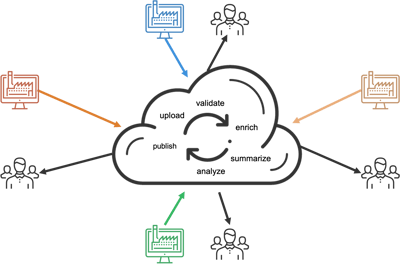
This case study involves a platform where multiple schools upload data to either an FTP site or via email and get an analyzed view of that data returned, built as a CloverDX data ingestion pipeline.
The ingest process involves several steps, in a single pipeline: monitoring both sources for incoming files, copying incoming files from the FTP, unzipping the files, checking against a manifest, profiling the data, transforming it, loading to target, and logging the results.
There are several places where the pipeline performs a check on the data: checking to see if the incoming file is zipped or not, so it can be handled differently without logging any errors, adjusting on the fly without manual intervention; checking against a manifest to make sure what's being received is what's expected; filtering to make sure only the right files are being checked; and the profiling step, which is where the bulk of the additional validation takes place.
At the profiling step, the pipeline runs two processes against a flat file: the profiler, giving a holistic, overarching view, and business rules validation, checking the data against specific rules. The pipeline doesn't necessarily stop if it encounters suspect data, but it does log it to Excel files.
Profiling in practice
Running this process shows the number of files flowing through at each step, and all the individual records coming across, profiled based on a number of different criteria, in this example, records based on classes, enrollments, students, and teachers.
The pipeline also checks the validation results for each record. For instance, checking for null records, with a defined threshold of 10%, if fewer than 10% of records are null, processing continues, but as soon as it hits that threshold, an error is logged and the user alerted, with results pulled into a spreadsheet.
Even before reaching that critical threshold, the data can be seen trending in the wrong direction, more and more null counts building up over time. With that information, an end user or support team can address errors before they even reach critical status, fixing the data before it fails outright.
Business rules validation
Each school in this example has different business rules, different ways of formatting teacher or class IDs, for instance, each very specific to a particular system or data source. The challenge in dealing with data ingestion from multiple sources is how to scale that up, without needing to build new data pipelines for each source.
Rather than listing validation rules explicitly for each source in the pipeline itself, the rules are externalized. The pipeline looks at a file for each school, and depending on which school it is, changes the variables, allowing the validation rules to change on the fly per source system.
Error handling and reporting
CloverDX lets you define how you want to handle errors. Some you might want to stop the pipeline for, but some softer errors you might not, though it's still useful to inform users about those soft errors in a way that's meaningful and lets them take action.
In this example, two Excel sheets get created, one showing errors by school, and one showing errors by date. The by-school report can be sent to those schools so they can fix common errors themselves. The errors-by-date report is useful internally, for instance to check how the pipeline is running over time.

Final thoughts: Decide deliberately, not by default
Good data validation isn't about catching every error, it's about deciding, deliberately, what happens next when one occurs. Whether that's failing a record, logging it and continuing, or alerting a non-technical team to fix it themselves, the right answer depends on the rule, not a single default setting applied everywhere.
Building data validation into your automated processes, the way the school example above does, lets you adapt on the fly to different data sources within a single pipeline, spot errors early with reporting that lets users pinpoint and fix problems, and scale up the number of customers or data sources you can handle without needing additional technical resource.
See how CloverDX's pricing scales with your business, not your data volume. Let's talk about data validation for your pipelines.

Share