Automating the customer data onboarding process means you can onboard more customers, more quickly, without needing to tie up, or hire more, expensive data engineering resource.
The technical detail below comes from real pipelines built for real clients, not a theoretical framework. Where the specifics differ, a finance client, a legal SaaS platform, a network of schools, a debt collection service, the underlying pattern stays remarkably consistent.
In this article, we'll be covering what a good onboarding pipeline needs to handle, how to drive it with configuration files rather than rebuilding it for every client, why a comprehensive integration platform can handle messy customer data as well as a specialized tool, and three real examples of this pattern working across very different industries.
We’ll walk through how a data onboarding pipeline in CloverDX works, and how it can handle your data onboarding on autopilot, no matter how many different clients you’re receiving data from.
Key takeaways
-
A good automated data onboarding pipeline handles the entire process end-to-end, including error handling, and is reusable across many clients rather than rebuilt for each one.
-
Holding all client-specific detail in external configuration files, rather than in the pipeline itself, turns a bespoke process into a generic, reusable framework.
-
A comprehensive integration platform can handle the variability of real customer data, when it supports dynamic validation and transformation, there’s no need for a specialized onboarding tool.
-
Letting non-technical business users manage data mapping and corrections through visual interfaces removes engineering as the bottleneck to onboarding more customers.
-
Real-world data ingestion frameworks built this way have worked across very different industries, from legal SaaS platforms to K-12 school networks to debt collection, using the same underlying pattern.
-
Automated jobs should run on a schedule, in response to a trigger, or on demand through an API, with full monitoring and error visibility built in from the start.
- Automating onboarding delivers direct cost savings by removing the engineering hours spent rebuilding the same process for every new client, not just a faster timeline.
You can watch CloverDX Director of Solutions Engineering Kevin Scott explain the process in detail:
What does a good customer data onboarding process look like?
You want your automated customer data onboarding pipeline to be a complete process – that handles the onboarding from start to finish, including handling errors and exceptions. It needs to manage every step:
- Detect that new data is available to onboard
- Inspect the layout and format of that data
- Read the data
- Map and transform data
- Assess data quality
- Load data to target
- Detect issues and log progress through each step
And a good customer data onboarding pipeline is also reusable. A single generic data job should be able to be used for many clients, as opposed to creating a new version of the process every time you need to ingest data from a new customer.
And this is what the process looks like when it’s implemented in CloverDX. This is an example pipeline built for a finance client, taking in data from their customers, transforming it in accordance with specific rules for each customer, and ingesting it into the finance client's platform. Each box in the pipeline contains all the steps needed for that particular part of the process.
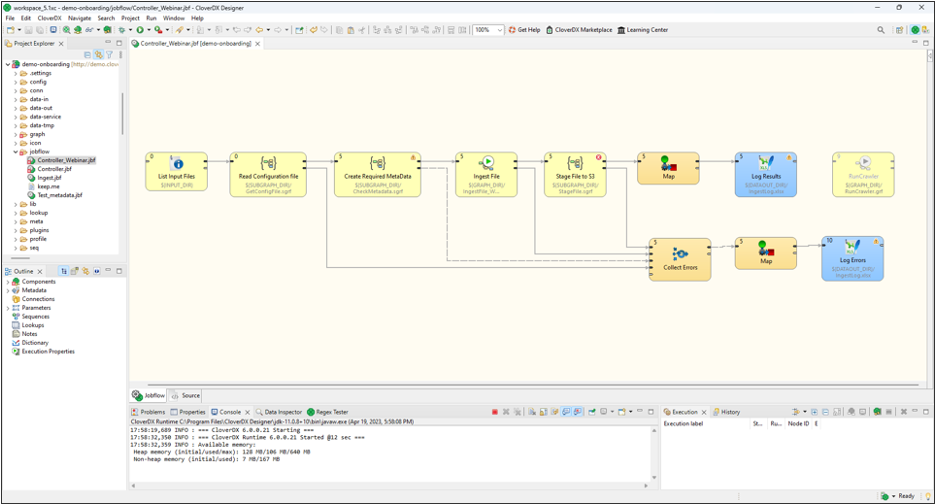
A customer data onboarding pipeline in CloverDX
Driving an automated data onboarding pipeline with configuration files
In this particular pipeline, we are matching a client's data with a specific configuration file so that we can onboard the data automatically.
In these two steps of the pipeline we’re detecting the data, and once we have that data we’re looking up a configuration file to give us instructions as to how the rest of the pipeline should behave.

Reading the configuration file to drive the data pipeline
This is a key practice for developing a single pipeline that can work for many clients, holding all the client-specific detail in configuration files. When you extract that client-specific detail out of the pipeline and into some external configuration file, the pipeline becomes essentially a generic processing and orchestration framework.
Want to see this process in a demo?
Request a demo of CloverDX and one of our engineers can walk you through an automated customer data onboarding pipeline and answer any questions.
This configuration can be stored virtually anywhere, including flat files and database tables. We often use Excel, for several reasons:
- It's human readable
- You can share this document with the end client. They can see what we’re planning on doing with the data and make it easier to collaborate on fixing any issues
- It allows less technical staff to modify and operate the pipeline
This is exactly the kind of collaboration CloverDX's self-service data prep capabilities are built for, giving business users real ownership over the parts of the process that need their judgment, without needing to touch the underlying pipeline itself.
This is an example of a 3 part configuration file that we used in this pipeline:

Configuration file with metadata about the client sending the data
You can see that in the first tab we have some metadata about the client that’s sending the data including their name, ID, contact info, expected arrival times and so on.
The second tab holds the mapping itself, the fields we expect to be in the data, their types, and rules about how to treat certain fields, such as whether to encrypt them or allow nulls.
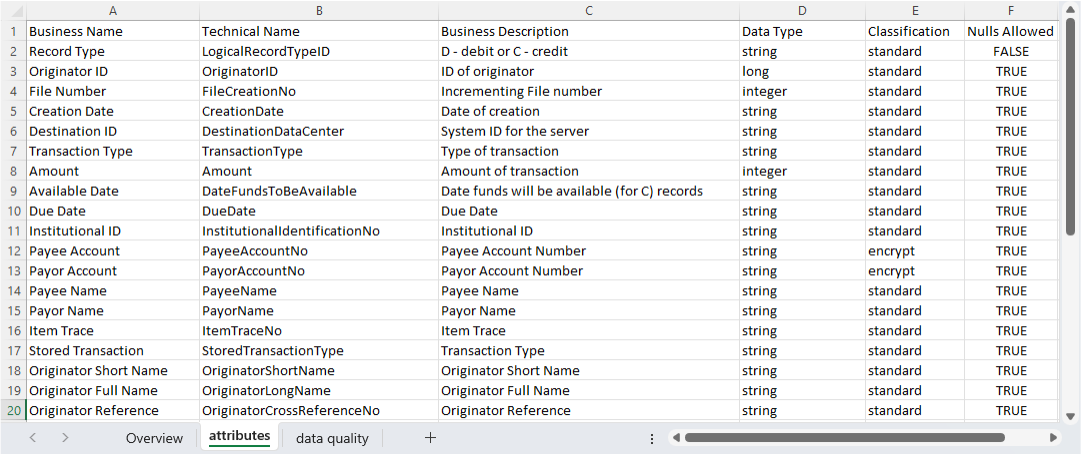
Configuration file with data mapping information
The last tab on the configuration has the client-specific data quality rules that the pipeline performs when it runs, at either the file or field level:

Configuration file with client-specific data quality rules
The benefit here is that the customer can easily understand these rules, and CloverDX can also translate these into instructions to implement in the pipeline at runtime.
These rules can be either at the file or field level, and they give us all the information we need to be able to onboard a specific customer data set.
Case study: How Zywave freed up engineer time by a third by automating customer data onboardingReading and processing the data
The next step is the ingestion, reading and processing the data and getting it into the system. A single Ingest File component can be drilled down further into individual steps, covering not only the 'happy path' of reading the file, doing the transformations, running quality assessments, and outputting the result, but also sections to detect and deal with any errors, and log all the data flowing through.
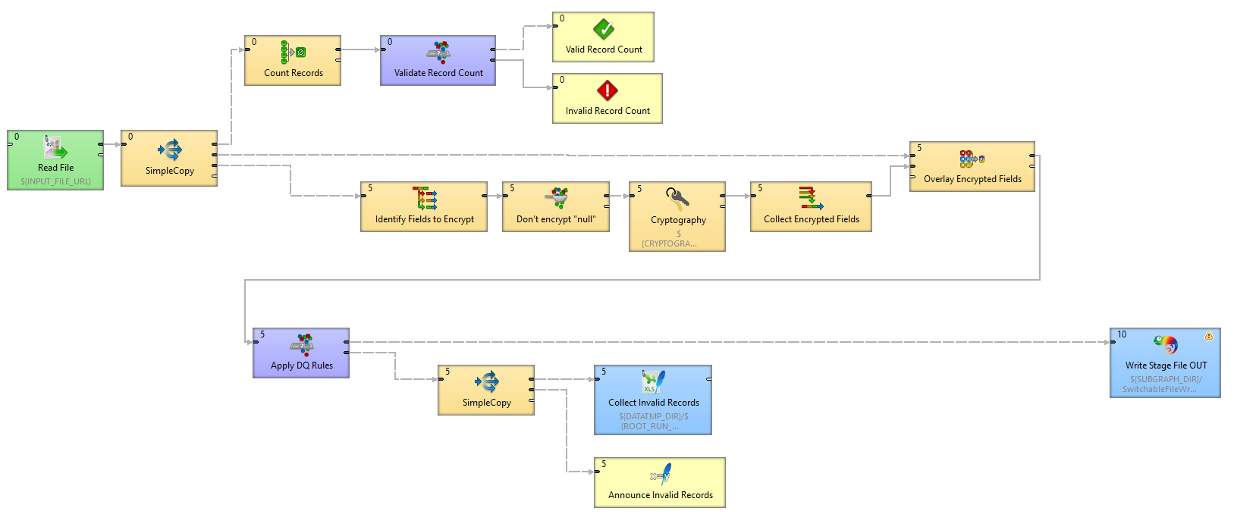
Detail of the ingestion part of the data pipeline
The pipeline also:
- Reads the file - in a generic way, without needing to know in advance what the incoming file it. The information the pipeline needs has been extracted from the configuration file and used to configure the reader component so it knows what it's supposed to be expecting.
- Counts the number of records to make sure it’s roughly what we’re expecting (again, set at a per-client level), if not we’ll stop the process.
- Performs the data transformation including encrypting certain fields.
- Validates individual fields - the platform performs data validation on individual fields to ensure data quality, including checking against the rules required for the particular platform we're ingesting into, also any client-specific rules for this dataset.
- Logs any records that fail these checks, and creates a human-readable file with details of these records and the reason they failed, so we can fix them and re-run the pipeline easily (crucially, without needing a developer to step in).
The whole process operates in production on CloverDX Server. You can run these jobs automatically and unattended, and they'll be monitoring and logged, as well as alerting you to any errors.
Why a comprehensive platform can handle messy customer data
A common assumption is that customer data, arriving in inconsistent, unpredictable formats, needs a specialized onboarding tool rather than a general ETL platform built for internal pipelines with known schemas. In practice, a comprehensive data integration platform that deals with a wide range of complex processes handles this just as well.
The pipeline described above already demonstrates this. It reads files generically without knowing the format in advance, applies client-specific validation and transformation rules from a configuration file, and handles errors without needing a developer on standby. None of that depends on a purpose-built onboarding product, it depends on the platform being flexible enough to treat variability as the normal case rather than the exception.
That flexibility shows up directly in schema mapping too, the pipeline doesn't need a fixed, predefined schema to work against, since the mapping rules themselves come from configuration, not from the pipeline's code.
A platform designed only for onboarding tends to make a narrow set of assumptions, and struggles outside them. A platform designed for the full range of data integration work, ingestion, transformation, validation, migration and orchestration, brings all of that same flexibility to the onboarding problem specifically, without needing a second tool for anything that falls outside a narrower product's assumptions.
This is exactly what CloverDX is built for, the same platform handling onboarding today can handle a completely different integration challenge tomorrow, without starting from scratch.
The three case studies below, a legal SaaS platform, a network of K-12 schools, and a debt collection service, have almost nothing in common as businesses, but the same underlying pipeline pattern, generic ingestion, configuration-driven mapping, and robust error handling, worked for all three.
Data ingestion frameworks in practice
Here's what this pattern looks like across three real, very different implementations.
Onboarding customer data to a legal SaaS platform
This client had ambitious objectives for getting data into their legal case management platform. The data ingestion framework needed to handle data in a variety of formats, without knowing in advance what the format was, land that data into staging tables in a relational database, and simplify re-tries without needing support from the technical team.
Input files are automatically detected, and the client can inspect and auto-detect the structure of the data and populate a staging table, all without needing transformation. They also receive error reports covering run duration, files ingested, records created and rejected, and why a run failed, letting them adjust the metadata and rerun without changing the pipeline itself. The result is faster, more efficient data onboarding and better service for their own clients.
Creating a data ingestion framework to onboard data from multiple school locations
Class schedules, enrollment figures, attendance records, schools deal with a lot of dynamic data, and need to share it with stakeholders who aren't usually very technical.
This client worked with data from a network of K-12 schools, having previously relied on a bespoke Python system that was challenging for users. They needed the ingestion process handled automatically so stakeholders always saw accurate, up-to-date data, needed to receive and process files in a variety of formats sent via both FTP and email, and needed the framework toadapt automatically whenever a new school was added, without building a new pipeline each time.
The resulting framework monitors an FTP site to automatically detect and process incoming files, while also scanning an email inbox for messages that meet particular criteria and pushing them into the same FTP process. CloverDX orchestrates the entire pipeline, including file unzipping, quality checking, sanity checking, data transformation, and pushing data to APIs and an S3 bucket.
The pipeline is entirely reusable, so the platform owners don't need to build a new one every time a new school is onboarded.
Onboarding data to a consumer debt collection platform
This client needed to automate customer data onboarding to remove barriers to client acquisition in the debt collection space. The framework needed to accept data in a variety of formats to accommodate however clients chose to provide it, enable non-technical users to onboard and update data without relying on development resource, and automatically look up and implement client-specific mapping and transformation rules for each category of file.
The resulting pipeline uses an Excel file to manage data mapping. The non-technical onboarding team could define mappings directly in the spreadsheet, without writing code, and the pipeline consults that spreadsheet to implement the mapping.
The solution also includes an automatically generated web app where non-technical users can upload an input file to trigger the pipeline, plus rich error logging so users can see which records were rejected and why, making debugging and re-running straightforward.
Automating data onboarding jobs in CloverDX
Jobs can be run on a schedule, in response to a trigger such as files arriving on an FTP site, or run whenever needed through an API endpoint that CloverDX automatically generates.
You can set up web interfaces that allow non-technical users to run the jobs, and even enable them to upload new configuration files if necessary, without ever needing to touch the main ingestion pipeline. This is especially useful when it comes to correcting errors, since it’s simple to re-run the pipeline on a corrected record set.
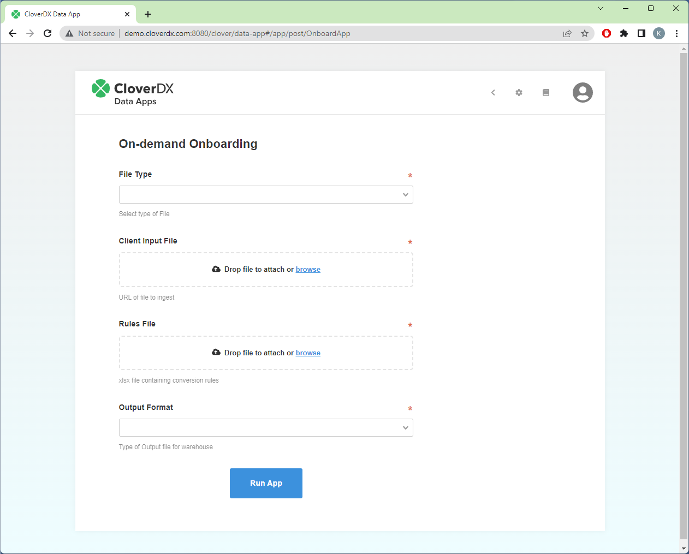
A user-friendly web interface (CloverDX Data App) to operate the onboarding pipeline
CloverDX Server monitors all jobs, and gives you information at a glance of any problems. You can drill down into detailed execution history, when, where and why the job failed, making it easy to triage and diagnose issues.
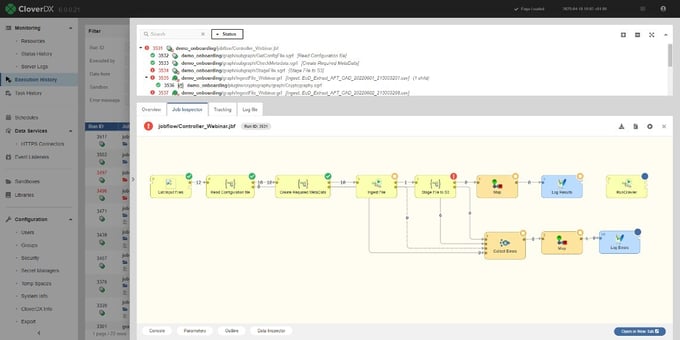
Visibility into errors in the automated customer data pipeline
Benefits of automating customer data onboarding
By creating a single customer data onboarding pipeline that runs automatically to ingest and transform data, regardless of format or quality, you free up significant time and resource, which in turn povides significant cost savings.
By using Excel-based configuration files and transparent, visual pipelines you open up the possibility of enabling less-technical users to manage the customer onboarding process, without needing to wait for IT resource.
For your business, this means you can:
- Onboard customers more quickly: No need for the engineering team to be a bottleneck to getting customers up and running. The faster customers can start using your platform, the faster they can realize value, and you can recognize revenue.
- Free up engineering resource: No need for highly technical teams to build a completely new onboarding process for each new customer, so their time can instead be spent on higher-value activities.
- Make life easier for your customers: No need for customers to spend significant time and money trying to format their data to fit your requirements. Instead you can take and work with whatever they have - a great addition to your value proposition.
Final thoughts: Build once, onboard every client
The pattern across all three case studies here is the same one that makes onboarding automation worth the investment. You build the core logic once, hold everything client-specific in configuration, and let the pipeline handle the variability that would otherwise need a developer's attention every time.
For the full business case behind why this matters, and more detailed customer processes, see Why SaaS Engineers Are Stuck Doing Manual Customer Data Onboarding, and How to Fix It.
A reusable, well-built onboarding pipeline pays for itself the moment you onboard your second customer, not just your fiftieth. Let's talk about how CloverDX can support automating customer data onboarding for your platform.


Share