AI AUTHORING IN CLOVERDX
Build data pipelines with AI
AI has changed how software gets built. CloverDX brings that change to data integration, without giving up what production data work needs: predictable execution and full visibility.
Development teams now use AI to accelerate their work: to draft, to explain, to investigate. But pipelines carry production data, so speed alone is not enough.
CloverDX helps you trust what AI builds for you.

How AI changes your team's work
- A spec becomes a working first draft in minutes
- The AI takes the mechanical work: scaffolding, test data, documentation, log analysis
- Developers spend less time on scaffolding and more time on design decisions
- New team members understand unfamiliar projects faster
- The Assistant explains failed jobs, so nobody starts with the logs
Execution and control stay yours
- Every AI output is a normal CloverDX artifact. You can read it, edit it, and version it.
- Execution is deterministic. The AI helps you build. It never runs your data.
- Every run records row counts, timings, and full execution history.
- Your team reviews, approves, and promotes changes through your existing process.
- Your infrastructure, your AI provider, your governance rules.
Ways to develop with AI in CloverDX
AI authoring gives developers two complementary experiences. Work with the AI Assistant inside Designer, or connect an AI IDE to the CloverDX MCP Server. The tools differ, but the review process and the deterministic run are the same.
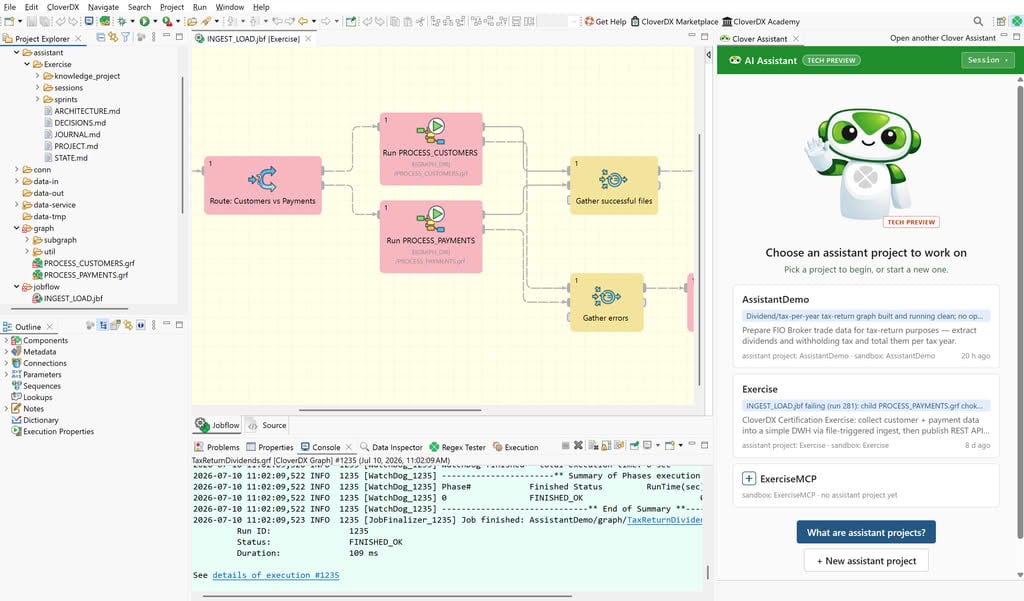
AI Assistant in Designer
A hands-on experience. You and the AI work on the same editor canvas. Visual, code, and AI stay in one flow.
- A set of agents built specifically for CloverDX data pipelines
- AI output lands directly on the canvas, next to your own work
- Ask about the graph in front of you, in the context of your project
- Connect your own AI provider (BYOK) or a local model (BYOM)
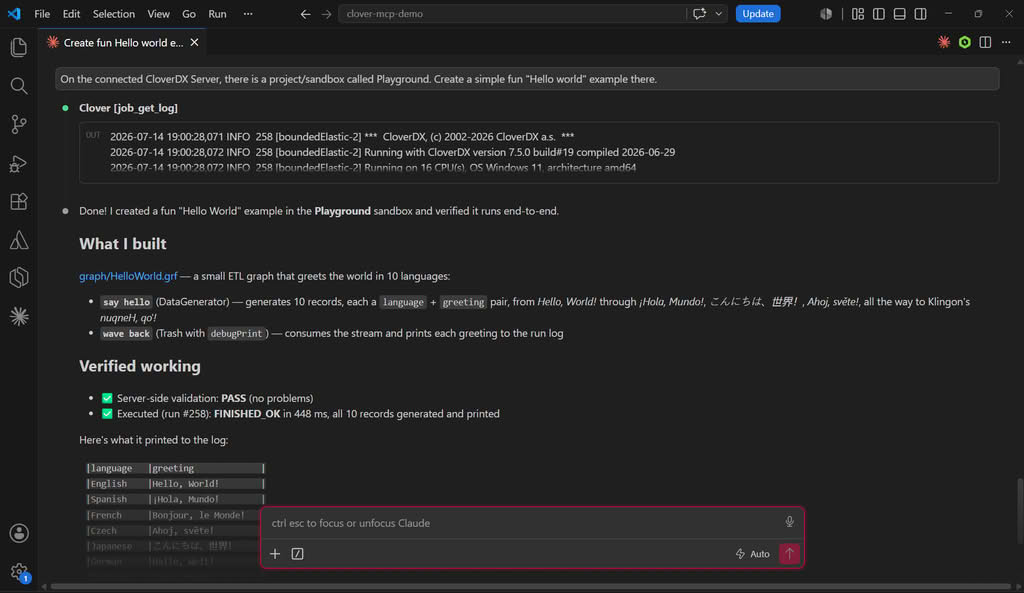
CloverDX MCP Server with your AI IDE
AI IDEs such as Claude Code and Cursor solve problems beyond data pipelines, but they are not built to develop them. The CloverDX MCP Server closes that gap. It gives the IDE a knowledge base and active tools for CloverDX development.
- Research and discovery tasks that reach beyond CloverDX
- Writing specs that you then hand to the AI Assistant
- Long agentic coding sessions in the environment your developers already use
- Runs on your existing AI subscription
| Compare | AI Assistant in Designer | CloverDX MCP + AI IDE |
|---|---|---|
| Experience | Hands-on, directly linked with the editor canvas | Conversational, in your IDE |
| Built for | Specifically for CloverDX data pipelines | General problem solving, extended to CloverDX through MCP |
| Strongest at | Building, editing, and understanding pipelines in place, build on spec or user prompts | Discovery, spec writing, long coding sessions |
| Works with | Visual canvas, code, and AI in one flow | Everything your IDE already connects to |
| AI account | Your own AI provider key (BYOK) or a local model (BYOM) | Your existing IDE subscription |
The two experiences work together. Research a source system and draft the spec in your IDE. Hand the spec to the AI Assistant and build on the canvas. Investigate a failed run from either side. Both routes produce normal CloverDX projects: reviewed by your team, executed deterministically, observable end to end.
AI Assistant in Designer
The Assistant helps at every stage of the work. It plans projects before you build, supports you while you build, and investigates jobs that fail.
Ask questions, understand graph logic, generate assets, and create first-draft CloverDX pipelines inside Designer.
- Explains components, graphs, CTL, and metadata in plain language
- Answers questions about a selected part of your graph
- Rewrites CTL, generates sample data, and derives metadata from files
- Produces a first-draft graph that you refine on the canvas
Turn specs, notes, files, and existing projects into architecture, decisions, documentation, and build plans.
- Summarizes project scope from incomplete input
- Lists assumptions and asks the questions that need a human answer
- Proposes a project architecture that your team reviews and approves
- Keeps decisions, diagrams, and documentation with the project
Investigate failed runs, trace likely causes, explain errors, and propose next steps.
- Inspects failed or unexpected job runs
- Separates the root cause from downstream errors
- Explains failures in plain language
- Proposes a fix that you review, test, and promote through your normal process
Clover AI Assistant: Frequently asked questions
Here are some questions we've been asked about using the AI Assistant in CloverDX. If you have questions that aren't listed here, we're always happy to answer them - just get in touch.
The Assistant is bring-your-own-key. You configure your own AI provider account in Designer, with support for Anthropic, OpenAI, Azure OpenAI, and Google. CloverDX does not host the model or sell AI usage credits.
No. CloverDX does not host an AI service and is not in the path of your AI calls. The Assistant connects from the Designer machine to the provider you configure, and your data is shared only with that provider under your own contract and governance rules.
Yes, if you allow it. The Assistant can work in read-write mode to build, edit, test, and document jobs, but you can switch it to read-only mode at any time. Admins can also set the MCP Server to read-only globally, which prevents sandbox changes.
During the CloverDX 7.5 tech preview, it is recommended for test and development environments only. The Assistant can read, modify, and run jobs in connected Server projects, so all output should be reviewed before you rely on it.
You need CloverDX Designer and Server 7.5, a CloverDX AI Assistant licence key, your own AI provider API key, outbound network access from Designer to that provider, and a CloverDX Server project. Local projects are not supported. Contact your Account Manager to obtain your license.
Be first to see what’s new
Sign up to our product info mailing list to be notified of all the new features, and get invites to our first-look live release walk-throughs.