SUPPORT & ADMINISTRATION
AI for Troubleshooting and Diagnostics of CloverDX Server
Find issues faster. Prevent problems sooner.
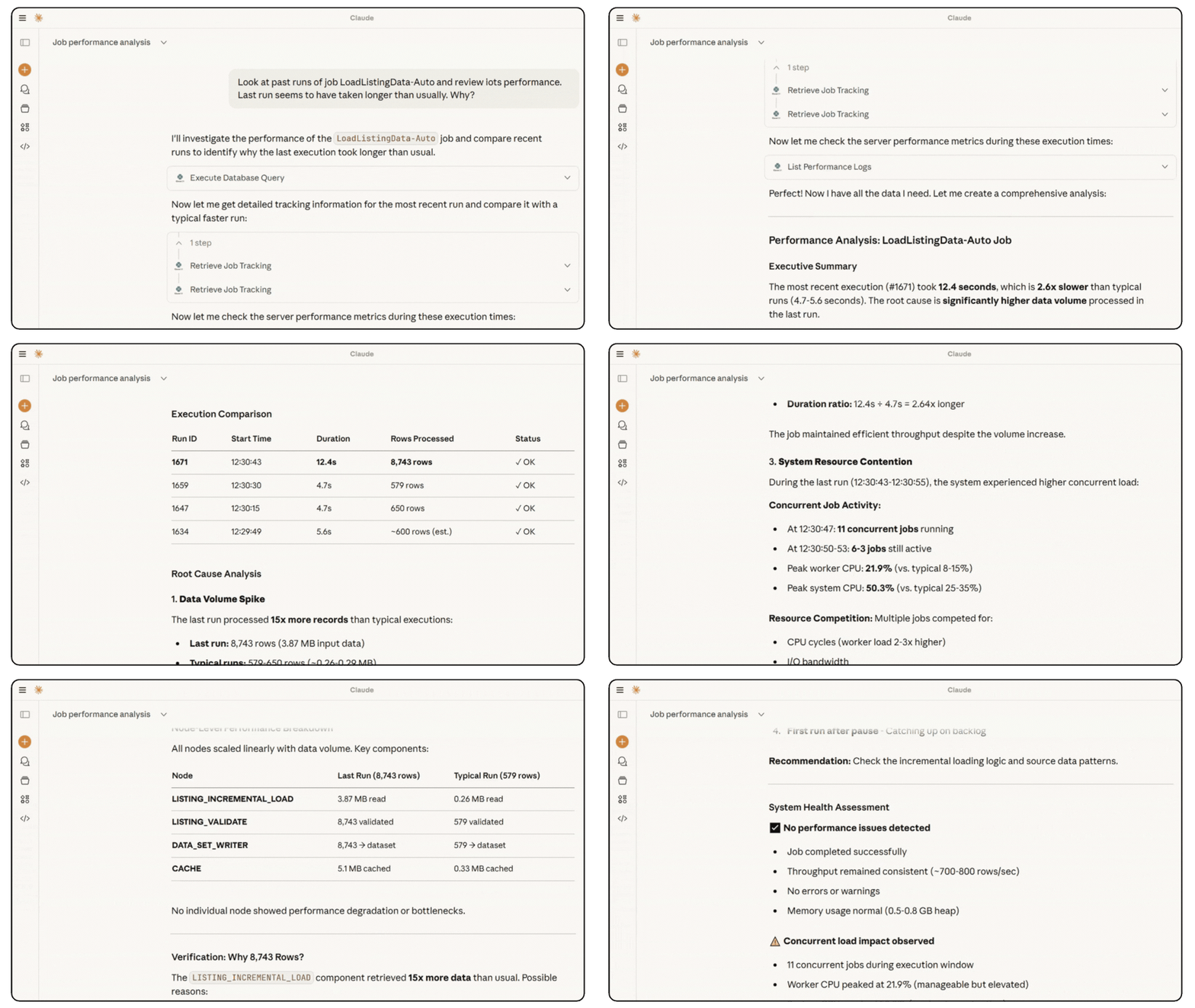
Troubleshooting CloverDX Server doesn’t have to mean hours in logs and metrics. With AI-powered diagnostics, you can securely connect tools like ChatGPT or Claude to your CloverDX Server and get instant insights into jobs, performance, and configuration.
Powered by the built-in MCP (Model Context Protocol) server, CloverDX lets you talk to your Server and quickly uncover what’s happening — and why.

Diagnose with AI,
Not Guesswork
Ask questions in natural language and let AI analyze CloverDX Server diagnostics directly:
-
Job executions and failures
-
Logs and performance metrics
-
Server health and configuration
An interactive diagnostic wizard guides the analysis based on symptoms, making advanced troubleshooting accessible to every admin and support engineer.
Save hours of tedious analyses
With AI as your troubleshooting companion, you can:
-
Analyze Server performance and resource usage
-
Identify memory and performance bottlenecks
-
Troubleshoot problematic or failing jobs
-
Detect early signs of risky jobs or upcoming faults
-
Optimize deployment and configuration
-
Resolve issues in minutes instead of hours

Seamless handover to
CloverDX Support
If you encounter an issue that requires help from the CloverDX Product Support team, the AI can assist with a smooth handover.
It can collect and summarize relevant diagnostics, context, and findings — so support has everything they need right away, reducing back-and-forth and speeding up resolution.

Try it out today
What need to start using AI for Server diagnostics:
- A ChatGPT or Claude desktop client
- CloverDX Server version 6.0 or newer
Check out our Installation of MCP on CloverDX Server for a complete installation guide.